Wednesday, December 17, 2025

Corel Draw

 Here are CorelDRAW tips for beginners to help you get comfortable quickly and work more efficiently:


1. Learn the Essential Tools First

Focus on these basics before exploring advanced features:

  • Pick Tool – move, resize, rotate objects

  • Shape Tool – edit nodes and curves

  • Rectangle / Ellipse Tools – build layouts fast

  • Text Tool – artistic text vs paragraph text

  • Zoom & Pan – speed up navigation

👉 Tip: Hover over any tool to see its shortcut.


2. Use Keyboard Shortcuts Early

Learning shortcuts saves tons of time:

  • Ctrl + Z – Undo

  • Ctrl + D – Duplicate

  • Ctrl + G / Ctrl + U – Group / Ungroup

  • Ctrl + Q – Convert object to curves

  • Spacebar – Toggle Pick tool temporarily


3. Work With Layers

  • Use Object Manager (Layers Panel) to organize designs

  • Lock background layers to avoid accidental edits

  • Name your layers clearly (Text, Logo, Background)


4. Master Alignment & Distribution

Instead of eyeballing:

  • Use Align and Distribute (Ctrl + A)

  • Align objects to page, center, or edges

  • Distribute spacing evenly for professional layouts


5. Understand Colors & Fills

  • Use CMYK for print, RGB for screen

  • Use Uniform Fill for solid colors

  • Use Fountain Fill for gradients

  • Save favorite colors in a custom palette

⚠️ Beginner mistake: Mixing RGB and CMYK in print designs


6. Convert Text to Curves Before Printing

  • Select text → Ctrl + Q

  • Prevents font issues on other computers

  • Always keep an editable copy before converting


7. Use PowerClip for Clean Layouts

PowerClip lets you place objects inside shapes:

  • Select object → Right-click → PowerClip Inside

  • Perfect for photo frames, logos, and mockups


8. Zoom in for Precision

  • Use F2 to zoom to selected object

  • Use F4 to view entire page

  • Edit nodes at high zoom for cleaner curves


9. Save Versions Often

  • Save incremental versions: design_v1.cdr, design_v2.cdr

  • Prevents losing work and allows easy rollback


10. Practice With Real Projects

Try simple beginner projects:

  • Business card

  • Social media post

  • Logo redraw

  • Flyer or poster

Recreating existing designs is one of the fastest ways to learn.


If you want, tell me:

  • Print or digital design?

  • Logo, banner, ID card, or social media?

  • Which CorelDRAW version are you using?

I can give you step-by-step beginner exercises or print-ready settings next.

 Image

Image

Image

Image

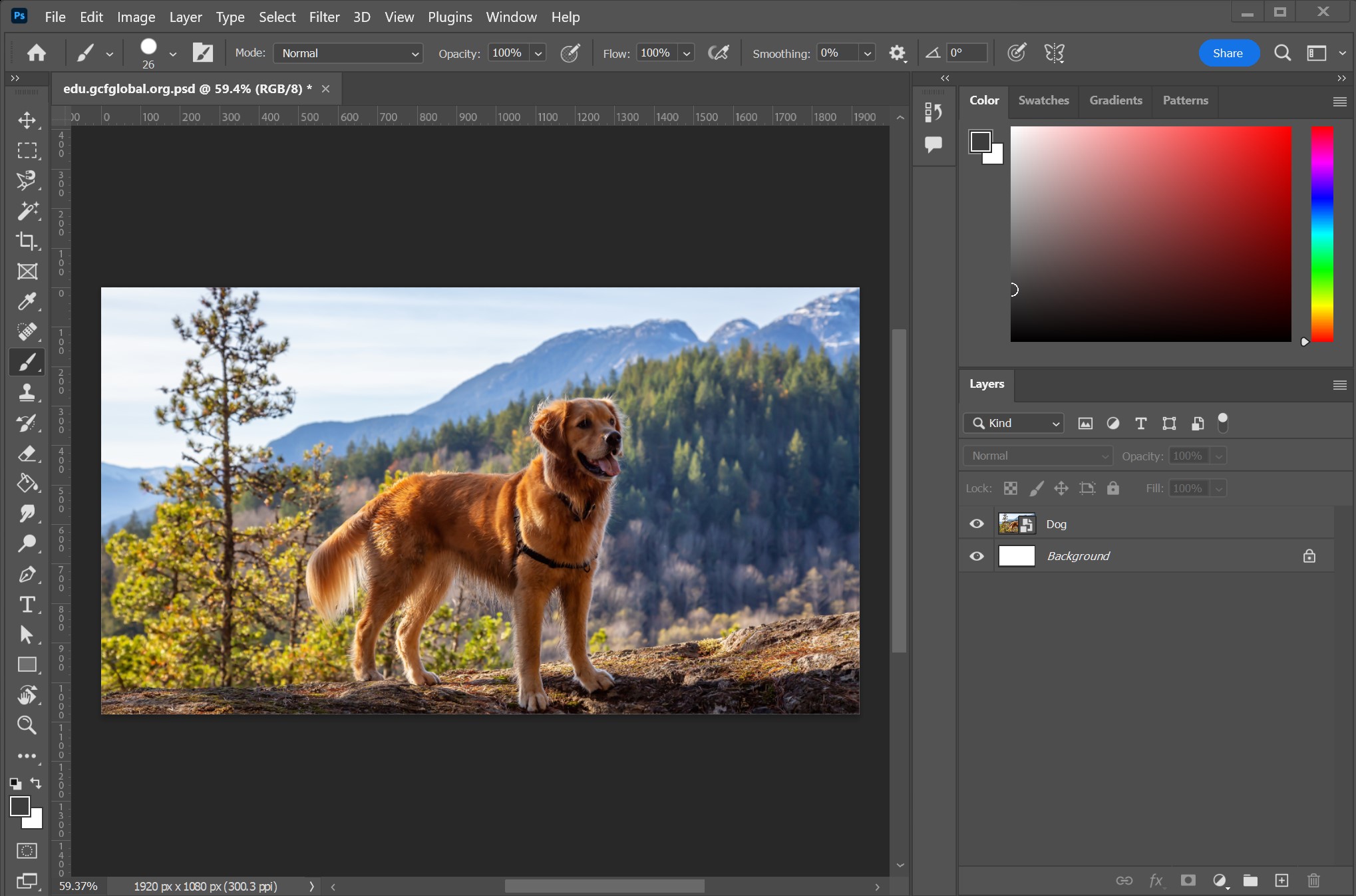
Here’s an overview of Adobe Photoshop — one of the most powerful and widely used image editing and graphic design programs in the world 👇

📌 What Adobe Photoshop Is

Adobe Photoshop is a professional raster graphics editor developed by Adobe. It lets you create, edit, and enhance images using layers, filters, and powerful tools — and it’s used by photographers, designers, artists, and creators worldwide. (Wikipedia)


🚀 Key Features of Photoshop

1. Layers & Masks
Create designs with multiple layers — like transparent sheets — so you can edit parts of an image independently. (adobe.com)

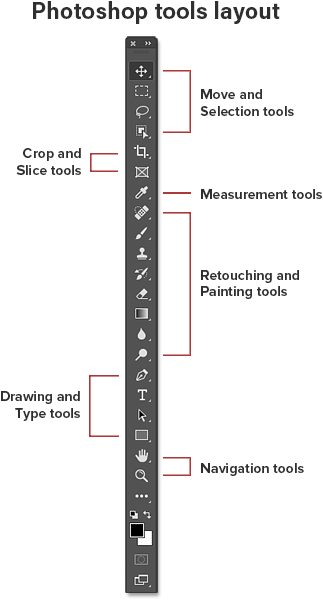
2. Selection & Editing Tools
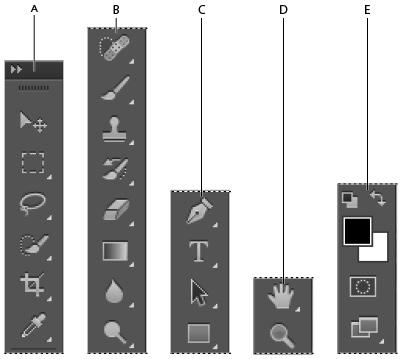
Tools like Marquee, Lasso, and Pen let you select and edit precise areas. (Techyv)

3. Color Correction & Filters
Adjust brightness, contrast, color balance, and add artistic effects with built-in filters. (Studocu)

4. Text & Graphic Design
Add and style text, shapes, and graphics for posters, logos, banners, or web layouts. (Training in TNagar)

5. Generative AI Tools
Newer versions include AI-powered editing like content-aware fill and generative tools that can create or modify image areas based on prompts. (Lifewire)

6. File Format Support
Save in many formats like PSD (native), JPEG, PNG, TIFF, and more for print or online use. (Studocu)


🧑‍🎨 What You Can Do With Photoshop

✔️ Retouch & enhance photographs
✔️ Remove or replace backgrounds
✔️ Create digital art
✔️ Design graphics for web and print
✔️ Combine multiple images into composites
✔️ Apply special effects and filters
✔️ Prepare images for social media, ads, or portfolios (Training in TNagar)


💡 Who Uses Photoshop?

Photoshop is used by:

  • Photographers — to clean up photos

  • Graphic Designers — for layouts and advertising

  • Digital Artists — for creative illustrations

  • Web Designers — for mockups and UI design

  • Social media creators & marketers — for polished visuals (Training in TNagar)


📱 Platforms

Photoshop works on:

  • Windows & macOS desktop

  • iPad & iOS mobile devices

  • Web version with essential editing tools (Wikipedia)


🧠 Fun Fact

The word “Photoshop” is often used as a verb — like “to photoshop an image” — but Adobe prefers people not use it that way. (Wikipedia)


Would you like a short beginner tutorial (step-by-step) on how to do something specific — e.g., remove a background, add text, or retouch a photo? Just tell me!

Graphics Designing

 Sure — I can create a graphic design image for you 😊

I just need a bit more detail so it matches what you want.

Please tell me:

  1. Topic / purpose (e.g., business promotion, event, education, social media post)

  2. Text or information you want shown on the image

  3. Style (modern, minimal, colorful, professional, creative, etc.)

  4. Platform/size (Instagram post, flyer, poster, presentation slide, etc.)

  5. Colors or branding (optional)

Once you share this, I’ll generate the designed picture with the information included. 🎨📊

Digital Marketing

 Digital marketing is the use of online channels to promote products, services, or brands and connect with customers where they spend time—on the internet.

Core areas of digital marketing

  • SEO (Search Engine Optimization): Improving your website to rank higher on Google.

  • SEM / PPC: Paid ads on search engines (e.g., Google Ads).

  • Social Media Marketing: Promotion on platforms like Instagram, Facebook, LinkedIn, TikTok.

  • Content Marketing: Blogs, videos, podcasts, infographics that educate or entertain.

  • Email Marketing: Newsletters, promotions, and automated email campaigns.

  • Affiliate Marketing: Partners earn commission for driving sales.

  • Influencer Marketing: Collaborating with creators who have an engaged audience.

  • Analytics & CRO: Tracking performance and improving conversions.

Why digital marketing matters

  • Reaches a global audience

  • Cost-effective compared to traditional marketing

  • Measurable results (clicks, leads, sales)

  • Highly targeted and personalized

Common tools

  • Google Analytics, Google Ads

  • Meta Ads Manager

  • SEO tools (Ahrefs, SEMrush)

  • Email tools (Mailchimp, HubSpot)

Would you like:

  • a simple explanation for beginners,

  • help creating a digital marketing strategy, or

  • guidance on learning digital marketing / getting a job in it?

Corel Draw

 Here are CorelDRAW tips for beginners to help you get comfortable quickly and work more efficiently: 1. Learn the Essential Tools First Fo...